
For the MacBook Pro
with Retina display
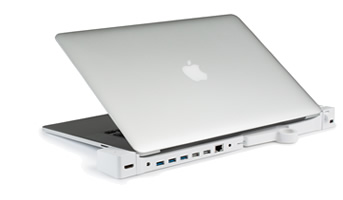
DOCK
For MacBook Pro with Retina Display
RELEASED 2012-2015
MODEL A1398, 1425, 1502
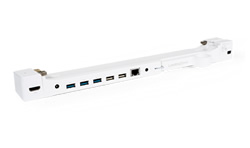
$199.00

FEATURES
Kensington® Security Slot
3 USB 3.0 Ports / 2 USB 2.0 Ports
HDMI Passthrough port
Mini DisplayPort
3 USB 3.0 Ports / 2 USB 2.0 Ports
HDMI Passthrough port
Mini DisplayPort
DOCK EXPRESS
For MacBook Pro with Retina Display
RELEASED 2012-2015
MODEL A1398, 1425, 1502
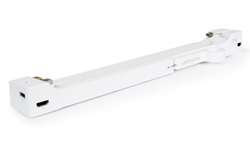
$99.00
FEATURES
Kensington® Security Slot
1 x SuperSpeed USB 3.0 Ports
HDMI Passthrough port
Mini DisplayPort
1 x SuperSpeed USB 3.0 Ports
HDMI Passthrough port
Mini DisplayPort
Products Compatibility Chart
Compare models and their features below.
| Compatibility | MacBook Pro Retina | |
|---|---|---|
| LandingZone Model | DOCK | DOCK Express |
| Kensington® Security Slot |  | |
| SuperSpeed USB 3.0 Ports | 3 | 1 |
| HighSpeed USB 2.0 Ports | 2 | |
| Gigablt Ethernet Port | | |
| Mini DisplayPort Support | | |
| Thunderbolt™ Devices | | |
| HDMI Port | | |
| Audio Port | | |
| Compatibility | MacBook Pro Retina | MacBook Air | ||
|---|---|---|---|---|
| LandingZone Model | DOCK | DOCK Express | 2.0 PRO | 2.0 LITE |
| Kensington® Security Slot | | | | |
| SuperSpeed USB 3.0 Ports | 3 | 1 | 4 | 2 |
| HighSpeed USB 2.0 Ports | 2 | |||
| Gigablt Ethernet Port | | | ||
| Mini DisplayPort Support | | | | |
| Thunderbolt™ Devices | | | | |
| HDMI Port | | | ||
| Audio Port | | |||
Learn more about each model’s ports, features, and connections.
-
-
 Kensington® Security
The Kensington Security Slot ensures added security for your MacBook Pro with Retina display. -
 USB 3.0 / 2.0
Built -in USB 3.0 and 2.0 ports allow you to connect multiple peripherals. -
 Mini DisplayPort
Mini DisplayPort allows connection to monitors and other devices -
 MagSafe 2 Power
Use your MacBook’s MagSafe power connector to charge your laptop. -
 Dual Displays
Connect up to 2 displays using the Mini DisplayPort and HDMI port. Use them with your MacBook lid open or closed. -
 Audio
Audio
Connect external speakers, headphones, microphones and more with the Audio port. -
 Gigabit Ethernet
Brings full Ethernet functionality to the MacBook Pro with Retina display. -
 LED Status Light
Shows you if your MacBook Pro with Retina display is running without having to open the lid.
-
-
- Kensington Security
The Kensington® Security Slot ensures optimal security for your MacBook Pro with Retina display. - USB 3.0
1 USB 3.0 port and an open native USB port allows you to connect other peripherals. - Mini DisplayPort
Mini DisplayPort allows connection to monitors and other devices. - MagSafe 2 Power
Use your MacBook’s MagSafe power connector to charge your laptop. - Dual Displays
Connect up to 2 displays using the Mini DisplayPort and HDMI port. Use them with your MacBook lid open or closed. - LED Status Light
Shows you if your MacBook Pro with Retina display is running without having to open the lid.
-